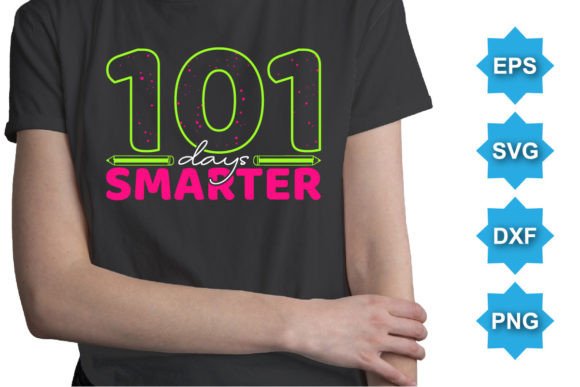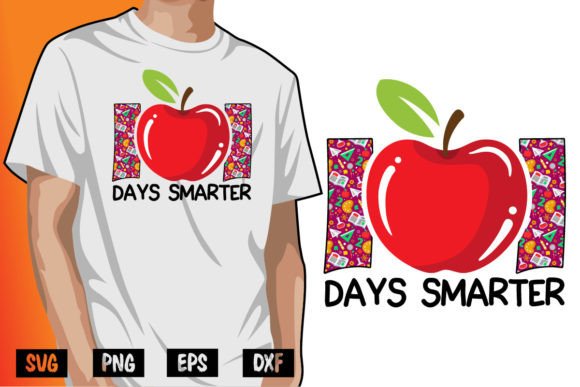
101 Days Smarter Back to School
If you're designing back-to-school merch, classroom resources, or educator-branded apparel—especially t-shirts—the 101 Days Smarter Back to School design isn’t just a graphic. It’s a flexible, production-ready asset built for real-world use. Think of it less as clip art and more as a smart, scalable design component: clean vector geometry, intentional spacing, and typographic rhythm that reads clearly whether printed on a toddler’s onesie or a teacher’s oversized crewneck.
A Design That Works Before You Even Adjust It
The visual personality of 101 Days Smarter Back to School lands somewhere between confident and approachable—structured enough for school district branding, warm enough for PTA fundraisers or homeschool co-ops. It uses bold, rounded sans serif letterforms with subtle weight contrast and open counters, which means it breathes well at small sizes and holds impact at large ones. There are no decorative flourishes or forced whimsy; instead, clarity and legibility drive the aesthetic. That’s why it feels equally at home on a laminated classroom poster, an Instagram story banner, or the chest print of a cotton-blend tee.
Unlike raster-based graphics that pixelate when scaled, this is built entirely from 100 vector shapes. Every curve, corner, and kerning adjustment is mathematically precise—so whether you’re resizing it to fit a 2-inch embroidery patch or blowing it up across a 48" x 72" vinyl banner, edges stay razor-sharp. No re-tracing. No guesswork.
Real Flexibility, Not Just Marketing Claims
“Color-changeable” often sounds like vague promise—until you open the file and see how it’s actually built. Each element in 101 Days Smarter Back to School is on its own layer or grouped logically, with swatches named and organized. Switching from white-on-black to black-on-white? A two-click global recolor in Illustrator—not hunting through dozens of ungrouped paths. Need to match your school’s official blue (PMS 2945) or a custom hex for your Etsy shop? The AI and EPS source files support spot color conversion, CMYK prep, and RGB export without degradation.
You get AI 10 and EPS 10 formats—both fully editable in Adobe Illustrator—and also SVG, DXF, and PNG. That means if you’re laser-cutting signs, running a Cricut for craft fairs, building a Shopify product mockup, or prepping files for a local screen printer, you’re covered. The PNG includes transparent background and multiple resolutions (including high-DPI for retina displays), so it drops cleanly into Canva, Figma, or PowerPoint without extra cleanup.
Where This Design Earns Its Keep
Designers and small business owners often overestimate how much time they’ll save on “ready-to-use” assets—until they hit the third round of revisions because the font wasn’t truly editable, or the colors couldn’t shift reliably across product variants. 101 Days Smarter Back to School avoids those pitfalls by design. For example:
- Educators use it to create consistent, professional-looking welcome packets—changing one color swatch updates every instance across a multi-page PDF, not just the cover.
- Print-on-demand sellers upload the same AI file to Printful, Gooten, and Amazon Merch, then toggle colors per variant (navy tee, heather grey, oatmeal) without rebuilding anything.
- Bloggers and content creators drop the SVG into their WordPress header or Substack banner, knowing it scales crisply on mobile and desktop alike—no blurry fallback images.
- Crafters import the DXF into Silhouette Studio or Cricut Design Space and cut vinyl or iron-on transfers with zero alignment issues.
This isn’t a display font meant only for headlines. It’s engineered for utility: short phrases, medium-length slogans, and even tight label applications—provided the context supports its bold presence. It doesn’t try to be everything; it does what it’s built for, consistently.
Testing Fit Before You Commit
Before dropping 101 Days Smarter Back to School into your next project, ask three practical questions:
- Does the tone match my audience? It reads friendly but authoritative—ideal for schools, tutoring centers, or edtech startups. Less suited for avant-garde art collectives or luxury lifestyle brands where minimalism or raw texture dominates.
- How will it behave at my smallest intended size? Test it at 16px on screen or 0.25" tall on fabric. If letters start to merge or lose distinction (especially the “1” and “l”), consider simplifying surrounding elements—not the design itself.
- What’s my output workflow? If you’re sending files directly to a printer who requires outlined fonts or embedded ICC profiles, the included EPS 10 ensures compatibility. If you’re working in Affinity Designer or CorelDRAW, the SVG and DXF give you reliable fallbacks.
No font pairing is mandatory here—but if you need supporting text (like “August 2024 • Grades K–8”), stick with neutral, highly legible sans serifs: Inter, Lato, or even system fonts like San Francisco or Segoe UI. Avoid competing scripts or overly decorative companions—the strength of 101 Days Smarter Back to School lies in its focused voice.
Licensing That Lets You Build, Not Just Browse
This isn’t a “personal use only” download. The commercial license covers physical products (t-shirts, mugs, stickers), digital goods (printables, Canva templates), and promotional use (social media ads, email headers). You don’t need to track sales volume or pay royalties. What you can’t do is resell the source file as-is or claim authorship of the design—but that’s standard, ethical practice across professional design assets.
Importantly, the license applies to the delivered files—not just the final rendered image. So if you modify the vector paths, adjust spacing, or combine it with your logo, the resulting work remains yours to use commercially. That kind of flexibility matters when you’re iterating fast for a pop-up shop or seasonal campaign.
Bottom line: 101 Days Smarter Back to School saves time not because it’s “easy,” but because it’s predictable, editable, and built with production realities in mind—from the first click in Illustrator to the final stitch on a garment tag.