Back to School Social Media Stories: Smart, Scalable Templates for Educators and Brands
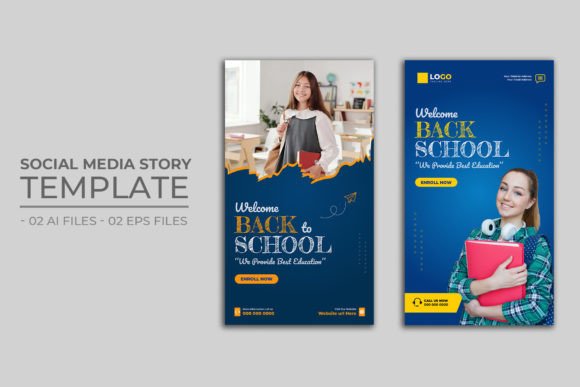
As summer winds down and classrooms begin to buzz again, social media managers, school marketers, teachers, PTA coordinators, and small business owners all face the same urgent need: fresh, engaging, on-brand content—fast. That’s where Back to School Social Media Stories step in—not as generic clipart or rushed Canva posts, but as purpose-built, fully editable templates designed specifically for the rhythm and energy of the new academic year.
Why Story Templates Matter More Than Ever in August
Facebook and Instagram Stories vanish after 24 hours—but their impact doesn’t. In fact, Stories consistently outperform feed posts in engagement rates, especially among parents (ages 28–45) and teens (13–19), two key audiences during Back to School season. Yet creating daily, visually cohesive, platform-optimized Stories is time-consuming. Designing from scratch means juggling fonts, spacing, aspect ratios, branding consistency—and often sacrificing quality for speed.
That’s why a well-structured template pack isn’t just convenient—it’s strategic. These aren’t static JPEGs. They’re built for flexibility, clarity, and real-world use—with every element placed intentionally for readability, visual hierarchy, and emotional resonance.
What Makes These Back to School Social Media Stories Stand Out?
Let’s break down what’s inside—and why each detail serves a practical function:
- 1080×1920 pixels, native vertical size — No cropping, no distortion, no guessing. Instagram and Facebook Stories render perfectly on mobile-first feeds, where over 93% of users view Stories.
- Fully editable layers in AI and EPS formats — Two Adobe Illustrator (.ai) files and two Encapsulated PostScript (.eps) files mean you can open, tweak, recolor, resize, and reposition text and shapes without losing fidelity—even if you’re updating a banner for “First Day Countdown” or swapping out a grade-level icon.
- No embedded images in the main file — This is intentional. You insert your own photos—student portraits, classroom setups, supply lists, or branded product shots—so every Story feels authentic and relevant to *your* school, district, or business. It also keeps file sizes lean and editing lightweight.
- Free, web-safe fonts included — No licensing headaches. No font substitution errors. The typefaces are clean, legible at small sizes, and optimized for quick scanning—critical when viewers spend an average of just 1.7 seconds per Story frame.
- Well-organized layer naming and grouping — Text blocks are labeled (“CTA Button”, “Date Stamp”, “School Logo Placeholder”), backgrounds are grouped separately, and color swatches are pre-defined. You don’t need design experience—just basic familiarity with Illustrator or even free tools like Inkscape (which opens EPS files).
Real-World Use Cases Across Roles
These Back to School Social Media Stories aren’t one-size-fits-all—they adapt to different goals and voices:
- School District Communications Teams — Launch a 7-day countdown series: “7 Days Until Bell Rings”, “Meet Your New Principal”, “Bus Route Updates”. Swap in official headshots and district colors; drop in PDF links via Instagram’s swipe-up (or link sticker) functionality.
- Classroom Teachers — Share weekly learning highlights: “This Week in 4th Grade Science”, “Student Spotlight”, “Library Book Recommendation”. Use the clean text layout to emphasize key vocabulary or reading goals—no clutter, no distraction.
- Local Businesses (Bookstores, Uniform Shops, Tutoring Centers) — Promote limited-time offers: “20% Off Backpacks – First 50 Customers”, “Free Homework Help Session – Aug 15 Only”. Insert product photos, add urgency-driven copy, and keep brand voice consistent across all touchpoints.
- PTA & Booster Clubs — Drive volunteer sign-ups or event RSVPs with clear CTAs: “Join Our Welcome Picnic”, “Sign Up to Chaperone Field Day”. The editable button zones make it easy to update dates, times, and contact info without redesigning.
How to Integrate These Templates Into Your Workflow
Adopting these templates doesn’t require overhauling your process—it simplifies it. Here’s how smart teams actually use them:
- Batch-create your first week — Open one AI file, duplicate artboards for each day, and update copy + imagery. Save each as a PNG sequence for upload. Done in under 45 minutes.
- Build a brand kit extension — Add your logo, primary and secondary colors to the Swatches panel. Save a custom .ai version named “OurSchool_Story_Template_v2”. Future edits become instant.
- Train volunteers or student interns — Because layers are clearly labeled and fonts are embedded, even non-designers can handle routine updates—freeing up your time for strategy and analytics.
- Repurpose across platforms — Resize the same layout for Instagram Feed (1080×1080) or Facebook Cover (820×312) by duplicating and adjusting canvas size—keeping messaging and visuals unified.
What to Watch For When Choosing Back to School Social Media Stories
Not all templates deliver equal value. Before downloading or purchasing, ask yourself:
- Is the file structure transparent? — If layers are flattened or named “Layer 1”, “Group 4”, editing becomes guesswork. Look for descriptive naming and logical grouping.
- Are dimensions truly native to Stories? — Some “vertical” templates are 9:16 but misaligned (e.g., 1080×1350). Always verify it’s 1080×1920—the exact spec Instagram and Facebook expect.
- Do fonts load reliably? — Free fonts are great—but only if they’re included as outlined text or packaged with the download. Avoid templates that rely on obscure or paid typefaces.
- Is image handling flexible? — Smart templates leave image frames as empty placeholders—not locked raster layers. That way, you control resolution, cropping, and copyright compliance.
Design Simplicity Meets Strategic Clarity
Great Back to School Social Media Stories don’t shout. They guide. A bold headline sets context in under two seconds. Ample white space prevents cognitive overload. Consistent iconography (like a chalkboard border or pencil motif) builds recognition without cliché. And because these templates avoid stock photo dependency, they invite authenticity—not decoration.
Think of them less as “graphics to paste” and more as communication scaffolds: frameworks that hold your message, amplify your voice, and honor your audience’s attention. In a season full of deadlines, forms, and transitions, that kind of reliability isn’t just helpful—it’s essential.
Ready to Get Started?
If you're evaluating options—or already using these templates—you’ll notice the difference immediately: faster turnaround, fewer revision rounds, and Stories that feel intentional, not incidental. Whether you're announcing bus schedule changes or launching a new after-school program, clarity starts with structure.
And if something feels unclear—whether it’s how to replace a placeholder, adjust color harmony, or export correctly—you’re not alone. The note in the listing isn’t just polite: “Feel free to contact me if you need assistance via our profile” reflects a real commitment to usability. Support isn’t an afterthought—it’s part of the design philosophy.
Because at its core, this isn’t about making pretty pictures. It’s about helping schools, educators, and local partners connect meaningfully—before the first bell rings.